Colour Palette Import
Download the Landcare palette file that matches the job, then import it into Affinity, Adobe Illustrator, Adobe InDesign, or another design app that supports ASE swatches.
For most design work, choose one of the ASE palettes below. Use RGB for screen, CMYK for process print, and Pantone coated or Pantone uncoated when a supplier needs Pantone references.
Brand Palette Downloads
Each brand section includes the importable palette files first. The visible URL is kept for project notes, artwork briefs, production checklists, and audit trails.
Group-facing brand
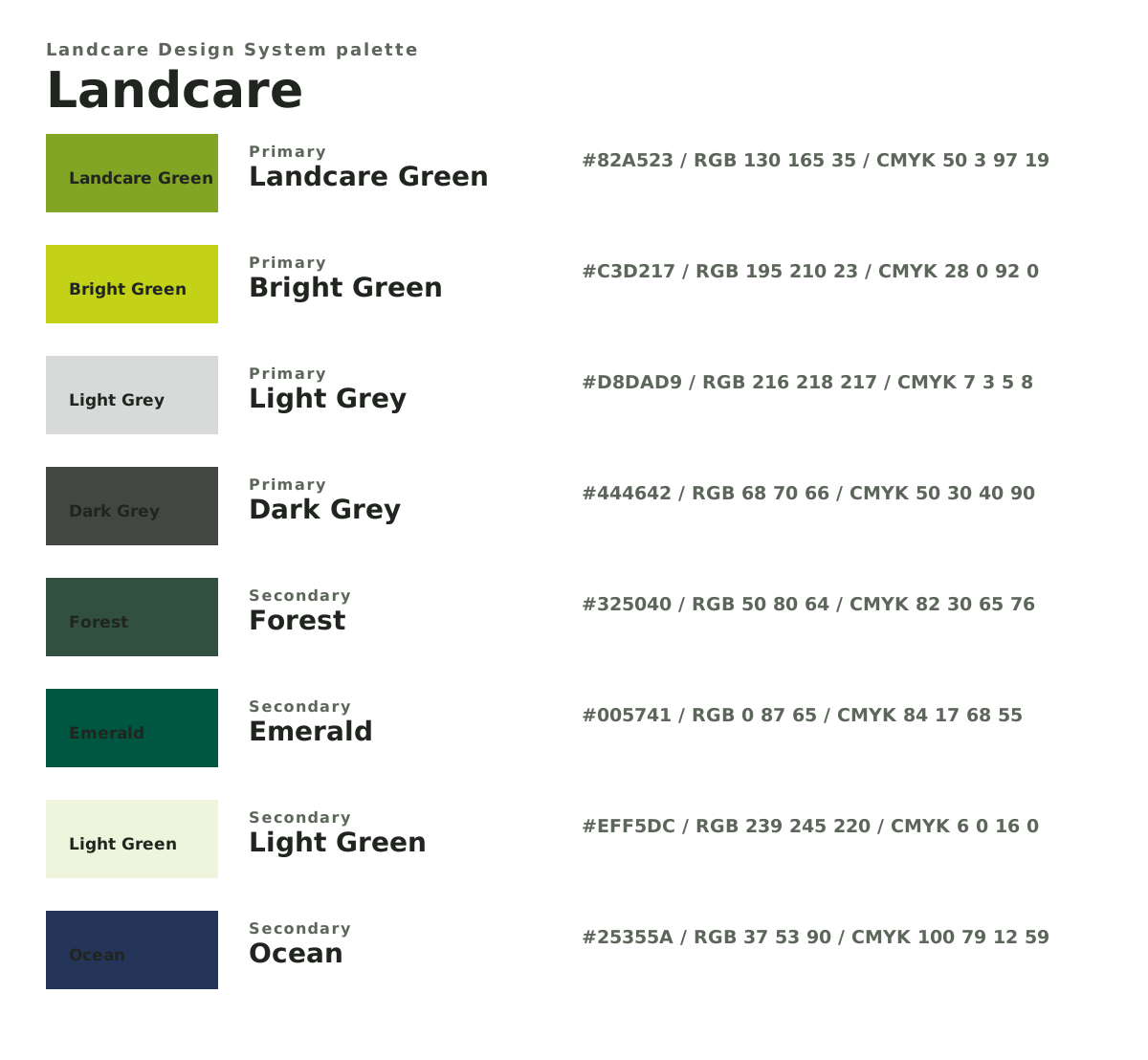
Landcare
Landcare Green #82A523. Choose the Affinity palette for the job: RGB for screen, CMYK for print setup, or Pantone reference palettes for supplier matching.- RGB palette
- https://landcare.dev/packages/designers/dist/landcare.palette.rgb.ase Import for websites, social graphics, video, screen artwork, and digital proofs. Download Landcare RGB palette
- CMYK palette
- https://landcare.dev/packages/designers/dist/landcare.palette.cmyk.ase Import when setting up print artwork that will be supplied in process colour. Download Landcare CMYK palette
- Pantone coated
- https://landcare.dev/packages/designers/dist/landcare.palette.pantone-coated.ase Import as coated-stock Pantone references for supplier conversations and checking. Download Landcare Pantone coated palette
- Pantone uncoated
- https://landcare.dev/packages/designers/dist/landcare.palette.pantone-uncoated.ase Import as uncoated-stock Pantone references for supplier conversations and checking. Download Landcare Pantone uncoated palette
- Visual reference
- https://landcare.dev/packages/designers/dist/landcare.palette.svg Place into a brief, proof, or Affinity file as a visible palette reference. Download Landcare visual reference
- Value register
- https://landcare.dev/packages/designers/dist/landcare.palette.csv Supporting file for audit and exact value checks across RGB, CMYK, Pantone, and CSS. Download Landcare value register
- Automation data
- https://landcare.dev/packages/designers/dist/landcare.palette.json Supporting file for scripts, audits, generated docs, or website tooling. Download Landcare automation data
National / master brand
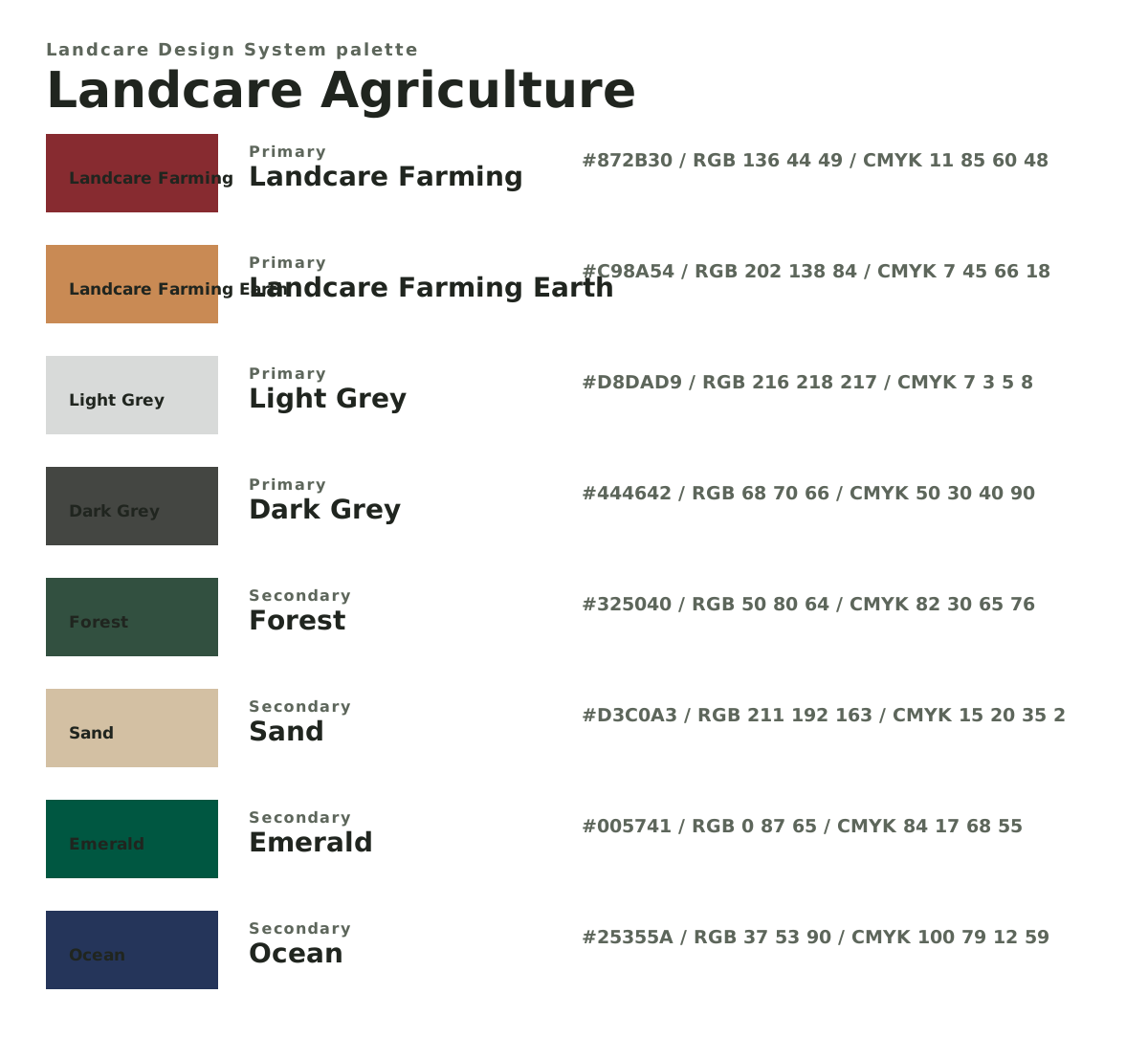
Landcare Agriculture
Landcare Farming #872B30. Choose the Affinity palette for the job: RGB for screen, CMYK for print setup, or Pantone reference palettes for supplier matching.- RGB palette
- https://landcare.dev/packages/designers/dist/landcare-agriculture.palette.rgb.ase Import for websites, social graphics, video, screen artwork, and digital proofs. Download Landcare Agriculture RGB palette
- CMYK palette
- https://landcare.dev/packages/designers/dist/landcare-agriculture.palette.cmyk.ase Import when setting up print artwork that will be supplied in process colour. Download Landcare Agriculture CMYK palette
- Pantone coated
- https://landcare.dev/packages/designers/dist/landcare-agriculture.palette.pantone-coated.ase Import as coated-stock Pantone references for supplier conversations and checking. Download Landcare Agriculture Pantone coated palette
- Pantone uncoated
- https://landcare.dev/packages/designers/dist/landcare-agriculture.palette.pantone-uncoated.ase Import as uncoated-stock Pantone references for supplier conversations and checking. Download Landcare Agriculture Pantone uncoated palette
- Visual reference
- https://landcare.dev/packages/designers/dist/landcare-agriculture.palette.svg Place into a brief, proof, or Affinity file as a visible palette reference. Download Landcare Agriculture visual reference
- Value register
- https://landcare.dev/packages/designers/dist/landcare-agriculture.palette.csv Supporting file for audit and exact value checks across RGB, CMYK, Pantone, and CSS. Download Landcare Agriculture value register
- Automation data
- https://landcare.dev/packages/designers/dist/landcare-agriculture.palette.json Supporting file for scripts, audits, generated docs, or website tooling. Download Landcare Agriculture automation data
Group-facing brand
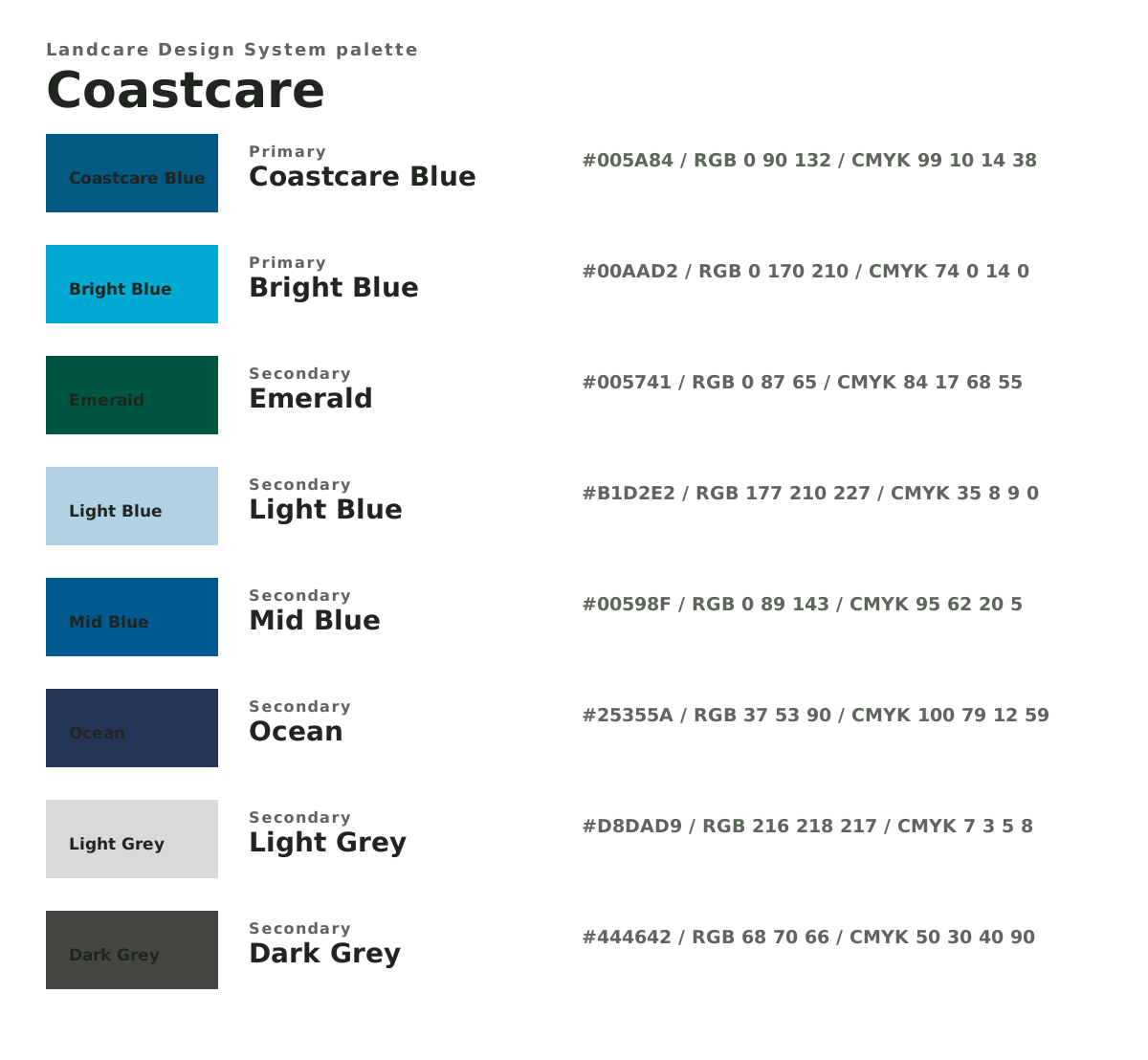
Coastcare
Coastcare Blue #005A84. Choose the Affinity palette for the job: RGB for screen, CMYK for print setup, or Pantone reference palettes for supplier matching.- RGB palette
- https://landcare.dev/packages/designers/dist/coastcare.palette.rgb.ase Import for websites, social graphics, video, screen artwork, and digital proofs. Download Coastcare RGB palette
- CMYK palette
- https://landcare.dev/packages/designers/dist/coastcare.palette.cmyk.ase Import when setting up print artwork that will be supplied in process colour. Download Coastcare CMYK palette
- Pantone coated
- https://landcare.dev/packages/designers/dist/coastcare.palette.pantone-coated.ase Import as coated-stock Pantone references for supplier conversations and checking. Download Coastcare Pantone coated palette
- Pantone uncoated
- https://landcare.dev/packages/designers/dist/coastcare.palette.pantone-uncoated.ase Import as uncoated-stock Pantone references for supplier conversations and checking. Download Coastcare Pantone uncoated palette
- Visual reference
- https://landcare.dev/packages/designers/dist/coastcare.palette.svg Place into a brief, proof, or Affinity file as a visible palette reference. Download Coastcare visual reference
- Value register
- https://landcare.dev/packages/designers/dist/coastcare.palette.csv Supporting file for audit and exact value checks across RGB, CMYK, Pantone, and CSS. Download Coastcare value register
- Automation data
- https://landcare.dev/packages/designers/dist/coastcare.palette.json Supporting file for scripts, audits, generated docs, or website tooling. Download Coastcare automation data
Group-facing brand
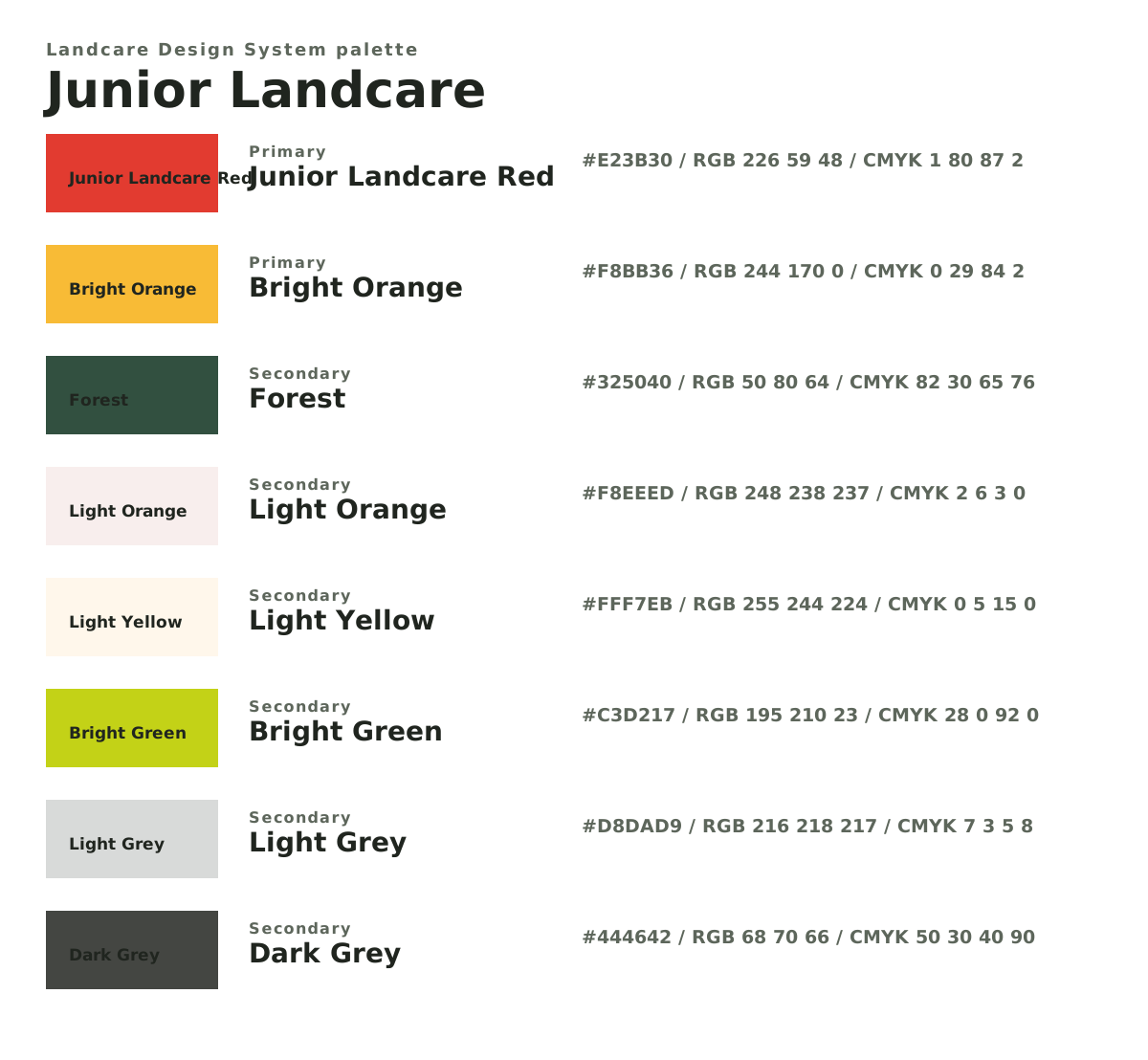
Junior Landcare
Junior Landcare Red #E23B30. Choose the Affinity palette for the job: RGB for screen, CMYK for print setup, or Pantone reference palettes for supplier matching.- RGB palette
- https://landcare.dev/packages/designers/dist/junior-landcare.palette.rgb.ase Import for websites, social graphics, video, screen artwork, and digital proofs. Download Junior Landcare RGB palette
- CMYK palette
- https://landcare.dev/packages/designers/dist/junior-landcare.palette.cmyk.ase Import when setting up print artwork that will be supplied in process colour. Download Junior Landcare CMYK palette
- Pantone coated
- https://landcare.dev/packages/designers/dist/junior-landcare.palette.pantone-coated.ase Import as coated-stock Pantone references for supplier conversations and checking. Download Junior Landcare Pantone coated palette
- Pantone uncoated
- https://landcare.dev/packages/designers/dist/junior-landcare.palette.pantone-uncoated.ase Import as uncoated-stock Pantone references for supplier conversations and checking. Download Junior Landcare Pantone uncoated palette
- Visual reference
- https://landcare.dev/packages/designers/dist/junior-landcare.palette.svg Place into a brief, proof, or Affinity file as a visible palette reference. Download Junior Landcare visual reference
- Value register
- https://landcare.dev/packages/designers/dist/junior-landcare.palette.csv Supporting file for audit and exact value checks across RGB, CMYK, Pantone, and CSS. Download Junior Landcare value register
- Automation data
- https://landcare.dev/packages/designers/dist/junior-landcare.palette.json Supporting file for scripts, audits, generated docs, or website tooling. Download Junior Landcare automation data
National / master brand
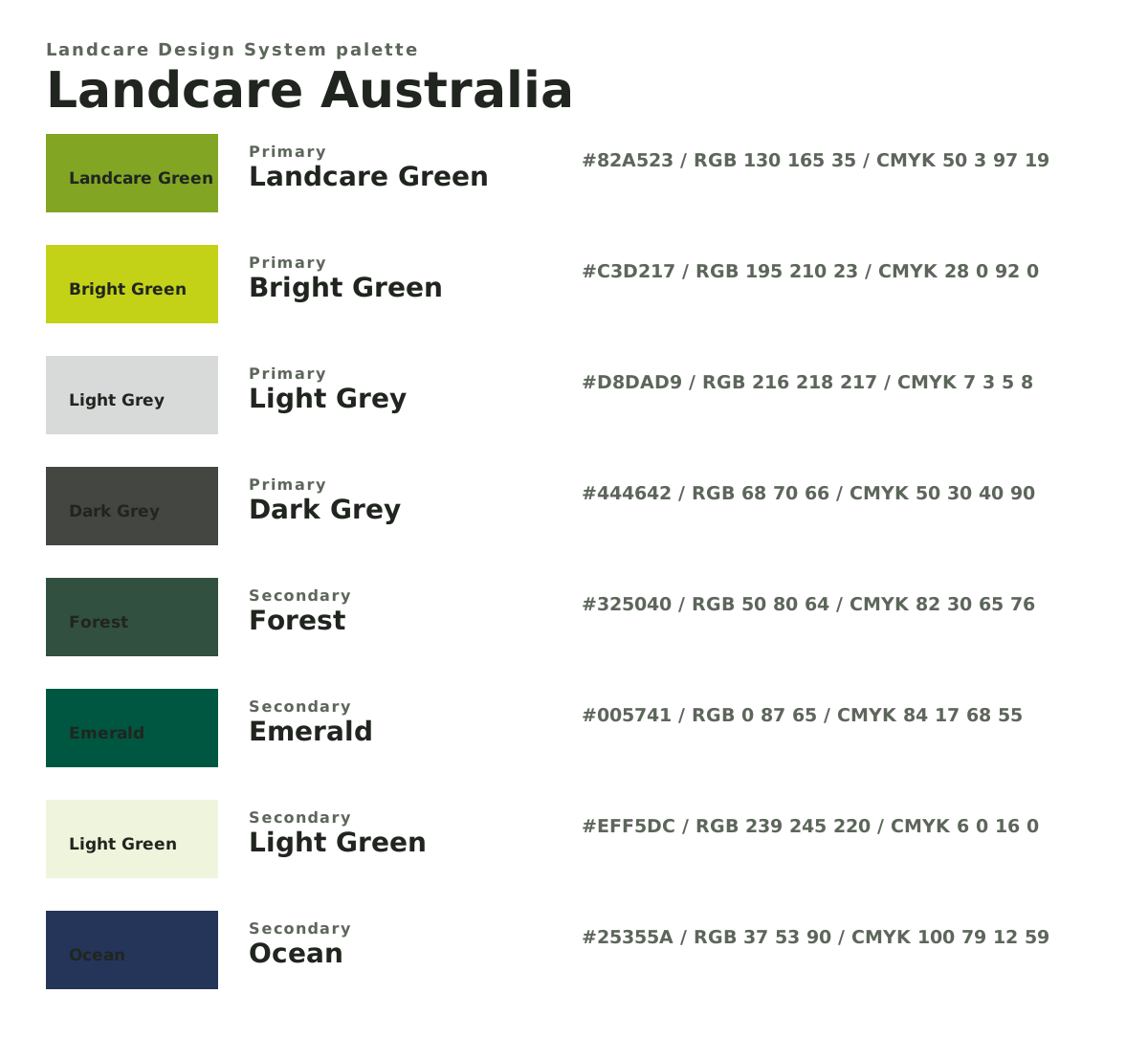
Landcare Australia
Landcare Green #82A523. Choose the Affinity palette for the job: RGB for screen, CMYK for print setup, or Pantone reference palettes for supplier matching.- RGB palette
- https://landcare.dev/packages/designers/dist/landcare-australia.palette.rgb.ase Import for websites, social graphics, video, screen artwork, and digital proofs. Download Landcare Australia RGB palette
- CMYK palette
- https://landcare.dev/packages/designers/dist/landcare-australia.palette.cmyk.ase Import when setting up print artwork that will be supplied in process colour. Download Landcare Australia CMYK palette
- Pantone coated
- https://landcare.dev/packages/designers/dist/landcare-australia.palette.pantone-coated.ase Import as coated-stock Pantone references for supplier conversations and checking. Download Landcare Australia Pantone coated palette
- Pantone uncoated
- https://landcare.dev/packages/designers/dist/landcare-australia.palette.pantone-uncoated.ase Import as uncoated-stock Pantone references for supplier conversations and checking. Download Landcare Australia Pantone uncoated palette
- Visual reference
- https://landcare.dev/packages/designers/dist/landcare-australia.palette.svg Place into a brief, proof, or Affinity file as a visible palette reference. Download Landcare Australia visual reference
- Value register
- https://landcare.dev/packages/designers/dist/landcare-australia.palette.csv Supporting file for audit and exact value checks across RGB, CMYK, Pantone, and CSS. Download Landcare Australia value register
- Automation data
- https://landcare.dev/packages/designers/dist/landcare-australia.palette.json Supporting file for scripts, audits, generated docs, or website tooling. Download Landcare Australia automation data
Choosing The Right File
| Need | Download |
|---|---|
| Screen artwork, websites, social media, video, digital proofs | .palette.rgb.ase |
| Process-colour print artwork | .palette.cmyk.ase |
| Coated stock, signage, decals, selected merchandise | .palette.pantone-coated.ase |
| Uncoated paper or natural paper stocks | .palette.pantone-uncoated.ase |
| Visible palette sheet for a brief, proof, or design file | .palette.svg |
| One readable table of every colour value | .palette.csv |
| Machine-readable palette for websites, scripts, or audits | .palette.json |
Importing Into Design Apps
Download the relevant .ase file, open the design file, then open Swatches and import or load the palette.
| App | Typical Path |
|---|---|
| Affinity | Open Swatches, use the panel menu to import a palette, then choose the .ase file. |
| Adobe Illustrator | Open Swatches, use the swatch library menu or panel menu, choose Other Library, then open the .ase file. |
| Adobe InDesign | Open Swatches, use the panel menu to load or import swatches, then choose the .ase file. |
Production Checks
Before sending artwork to print, signage, or merchandise production, confirm the output method with the supplier. Use the current landcare.dev palette files as the source of truth if a local swatch, old file, or pasted value differs.